Culling tuned for eyes, wings,
and fur — not faces.
I built BurstPick to cull my own wildlife sessions — from brown bears to birds in flight, it scores every frame for a sharp eye and a clean catchlight, right on your desktop. Nothing is ever uploaded.
Free 14-day trial · $55 founding price for the first 100 buyers.
Pick
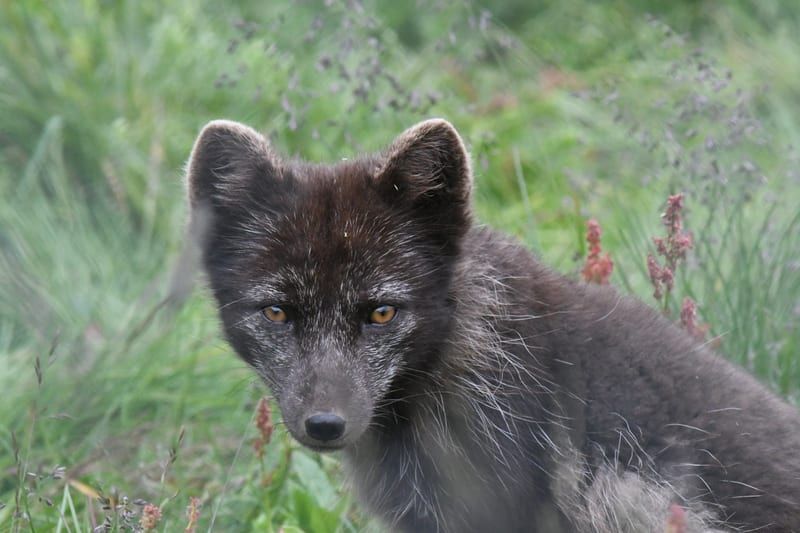
You shot 3 frames. BurstPick surfaced #1 as the keeper.
The scoring rubric
Six things every keeper gets right
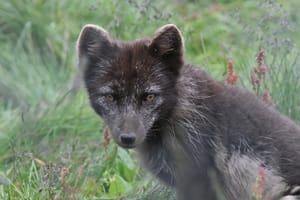
A face-detection culler sees a fox and shrugs. BurstPick was tuned on mammal and bird bursts — it scores the catchlight in the eye, the sharpness on the animal (not the branch behind it), and whether the subject reads against its habitat.
Live scores · DSC_0275.NEF
DIM 01
Focus
Edge sharpness on the subject — not the branch behind it.
DIM 02
Eye visibility
Eyes open, catchlight present, in focus.
DIM 03
Exposure
Recoverable highlights and shadow detail in the RAW.
DIM 04
Composition
Subject placement, headroom, leading space in the frame.
DIM 05
Noise
ISO-aware: grain is allowed, only banding and hot pixels are penalized.
DIM 06
Context
Subject in its environment — a keeper the tool doesn't mistake for clutter.
Shown: one frame from a real cull. Every photo gets the same six.
From chaos to clarity
4 frames, one keeper — found in under a second.
1/4 72
2/4 81
3/4 80
4/4 77 ~2 minutes of pixel-peeping each frame.
Beyond the score
The cull, end to end
The score gets you to the keeper. Everything else is the workflow around it — built so a full shoot clears in one sitting, without your hands leaving the keyboard or your files leaving the machine.
Cull without leaving the keyboard
P picks, X rejects, and BurstPick auto-advances to the next unflagged frame — one keystroke per decision. Disagree with a score? Alt+1–5 stamps your own rating, and your override wins everywhere the score is shown.
P pick · X reject · Alt+1–5 rate
Live folder watch
Point BurstPick at a folder while your card copies in — new frames are grouped and scored as they land, and an Add chip folds them into the grid on your cue. Pause the watch any time you want the grid to hold still; resume and a one-time catch-up picks up whatever changed.
Live · new frames score as they land
Tune the score to your eye
One panel adjusts everything: presets for different goals, relative-importance sliders for the six criteria, and situational preferences like hidden-eye or high-ISO forgiveness. The grid re-ranks live as you drag — or click Calibrate from my picks and let your own keepers set the weights.
Drag a weight · the grid re-ranks live
See why it picked, not just what
Every frame carries its per-dimension breakdown — focus, eye visibility, exposure, composition, noise, context — in the panel beside the photo. When BurstPick stars a frame as the best of its burst, you can read exactly why it won, and overrule it when you see it differently.
Six numbers behind every score
Merge & split bursts
The detector gets the first pass; you get the last word. Merge over-split sequences with one key, split a burst at any frame, and hand-edited bursts lock so a rescan never undoes your work.
M merge · S split · edits lock
Lightroom handoff
Picks, rejects, and ratings round-trip through XMP sidecars and metadata, so your flags land in Lightroom or Capture One ready for the edit — no re-culling in your catalog.
XMP sidecars · ratings · flags
Compare: Champion & Contenders
Coming in v1.6Hold a growing set of up to four frames side by side, with one gold champion that keeps its place while contenders rotate in — promote a challenger the moment it wins.
Up to 4 up · one champion
Smart Zoom
Coming in v1.6Synced zoom that re-finds the subject in every frame of the burst, so the eye stays under the loupe as you step through — even when the animal moves across the frame.
The loupe follows the eye
Compare and Smart Zoom are in beta with testers now — landing in v1.6 for every license.
Composite 80 · picked from the same cull
This is what BurstPick kept.
Everything else got culled.
DSC_2222.NEF · 1/800s · ISO 1600 · 500mm
A real session, start to finish
Minutes, not hours
Pulled from a typical October cull. The counts are real; the timings are approximate for a mid-range GPU.
- 00:00
Folder opened
4,605 frames · Nikon D500 · October session
- 00:04
Bursts detected
1,577 groups · timestamps within 0.8s
- 00:28
Scoring complete
GPU pass · 6 dimensions × 4,605 frames
- 04:15
236 high-score frames surfaced
Composite ≥ 80 · one keystroke to pick or reject
- 04:40
Exported to Lightroom
Metadata + XMP flags preserved
4,605 frames → 236 keepers → ~4 min total
Built for wildlife and action photographers
No cloud
Runs 100% on your machine
6
Scoring dimensions per frame
15
RAW & image formats
1 key
To pick, reject, or rate
Questions
Frequently asked questions
Do my photos get uploaded to the cloud?
Which cameras and file formats does BurstPick support?
What does BurstPick score each frame on?
How much does BurstPick cost?
Which operating systems does it run on?
Is BurstPick built specifically for wildlife photography?
Does BurstPick work for bird photography?
Version 1.5.1 · Available now
Download BurstPick
Try it free for 14 days — no account, and nothing leaves your machine. Founding-member pricing is $55 for the first 100 buyers, then $89.
Free 14-day trial · no account required
Will run on macOS 12+, Windows 10+, or Ubuntu 22.04+ · 8 GB RAM recommended
Supported formats
Canon, Nikon, Sony, Fujifilm, OM System, Panasonic, and Pentax RAW — plus JPEG, HEIC, TIFF, and PNG.
Stay in the loop
Founding pricing ($55, first 100 buyers) is live now. Subscribe for new releases, culling tips, and a heads-up before the founding seats run out.
No spam — just product updates. Unsubscribe anytime.